代码仓库ChainReaction

本指南将帮助你在几分钟内从简单的设置到构建一个功能完整的AI智能体。

构建基础智能体

Quickstart.py

首先创建一个简单的智能体,能够回答问题并调用工具。该智能体将使用DeepSeek作为语言模型,一个基础的天气函数作为工具,以及一个简单的提示来指导其行为。

对于此示例,你需要设置一个 DeepSeek 账户并获取API密钥。然后,在你的终端中设置 DEEPSEEK_API_KEY 环境变量,或创建.env文件,通过 python-dotenv 加载它。

1
2
3
4
5
6
7
8
9
10
11
12
13
14
15
16
17
18
19
20
21
22
23
24
25
26
27
28
29
30
31
32
33
34
35
36
37
38
39
40
41
42
43
44
45
46
47
48
49
50
51
import os # 导入操作系统接口模块,用于访问环境变量等系统功能
from langchain_openai import ChatOpenAI # 导入LangChain的OpenAI聊天模型类,用于与AI模型进行交互
from dotenv import load_dotenv # 导入dotenv模块,用于从.env文件加载环境变量
from langchain.agents import create_agent # 导入LangChain的智能体创建函数,用于构建AI智能体

# 加载.env文件中的环境变量
# 这会将.env文件中的变量(如DEEPSEEK_API_KEY)加载到环境变量中
load_dotenv()

def get_weather(city: str) -> str:
"""获取指定城市的天气信息。
参数:
city (str): 城市名称
返回:
str: 天气信息字符串
"""
# 这是一个简单的工具函数示例
# 在实际应用中,这里可能会调用天气API获取真实数据
return f"It's always sunny in {city}!"

# 初始化DeepSeek聊天模型
# 使用LangChain的ChatOpenAI类配置DeepSeek模型
model = ChatOpenAI(
# 从环境变量获取DeepSeek API密钥
api_key=os.getenv('DEEPSEEK_API_KEY'),
# 指定DeepSeek的API端点
base_url="https://api.deepseek.com/v1",
# 指定使用的模型为deepseek-chat
model="deepseek-chat"
)

# 创建AI智能体
# 使用create_agent函数将模型、工具和系统提示组合成智能体
agent = create_agent(
# 指定要使用的语言模型
model=model,
# 指定智能体可用的工具列表
tools=[get_weather],
# 设置系统提示,定义智能体的角色和行为
system_prompt="You are a helpful assistant",
)

# 运行智能体
# 调用智能体的invoke方法,传入用户消息
result = agent.invoke(
# 输入格式为包含消息列表的字典
{"messages": [{"role": "user", "content": "what is the weather in sf"}]}
)

# 打印智能体的响应结果
print(result)

要了解如何使用LangSmith跟踪你的智能体,请参阅 LangSmith文档

先决条件

在开始之前,请确保已安装以下依赖:

1
pip install langchain langchain-openai python-dotenv

环境设置

在你的项目根目录中创建一个.env文件,包含你的DeepSeek API密钥:

1
DEEPSEEK_API_KEY=你的_deepseek_api_密钥

关键组件说明

  1. 模型配置
    我们通过以下方式配置ChatOpenAI类以与DeepSeek配合使用:

    • base_url: DeepSeek的API端点
    • model: 使用”deepseek-chat”进行一般对话
    • api_key: 从环境变量获取的DeepSeek API密钥
  2. 工具定义 : get_weather函数是一个简单的工具,智能体可以调用它。工具允许你的智能体与外部系统交互并执行特定任务。

  3. 智能体创建:
    create_agent函数结合了:

    • 你配置的DeepSeek模型
    • 可用工具
    • 定义智能体行为的系统提示

预期输出

当你运行代码时,应该看到类似以下的输出:

1
{'messages': [HumanMessage(content='what is the weather in sf', additional_kwargs={}, response_metadata={}, id='d35c8bd3-babd-4e9f-8d01-09f40cdbe8bc'), AIMessage(content="I'll check the weather in San Francisco for you.", additional_kwargs={'refusal': None}, response_metadata={'token_usage': {'completion_tokens': 26, 'prompt_tokens': 158, 'total_tokens': 184, 'completion_tokens_details': None, 'prompt_tokens_details': {'audio_tokens': None, 'cached_tokens': 0}, 'prompt_cache_hit_tokens': 0, 'prompt_cache_miss_tokens': 158}, 'model_provider': 'openai', 'model_name': 'deepseek-chat', 'system_fingerprint': 'fp_ffc7281d48_prod0820_fp8_kvcache', 'id': '469314cd-3acf-4355-affd-30a29aee0677', 'finish_reason': 'tool_calls', 'logprobs': None}, id='lc_run--3c48d025-b42c-4505-8198-dfa5d87aa289-0', tool_calls=[{'name': 'get_weather', 'args': {'city': 'San Francisco'}, 'id': 'call_00_aPCk2VWEgG0g5dBDivfWNW5b', 'type': 'tool_call'}], usage_metadata={'input_tokens': 158, 'output_tokens': 26, 'total_tokens': 184, 'input_token_details': {'cache_read': 0}, 'output_token_details': {}}), ToolMessage(content="It's always sunny in San Francisco!", name='get_weather', id='1e3c7fd0-0899-486a-9784-1c5ad5dfd738', tool_call_id='call_00_aPCk2VWEgG0g5dBDivfWNW5b'), AIMessage(content="According to the weather information, it's always sunny in San Francisco!", additional_kwargs={'refusal': None}, response_metadata={'token_usage': {'completion_tokens': 14, 'prompt_tokens': 195, 'total_tokens': 209, 'completion_tokens_details': None, 'prompt_tokens_details': {'audio_tokens': None, 'cached_tokens': 128}, 'prompt_cache_hit_tokens': 128, 'prompt_cache_miss_tokens': 67}, 'model_provider': 'openai', 'model_name': 'deepseek-chat', 'system_fingerprint': 'fp_ffc7281d48_prod0820_fp8_kvcache', 'id': '18b0c6cc-8a9d-434e-aa44-62f8ee5f17ee', 'finish_reason': 'stop', 'logprobs': None}, id='lc_run--6134fe49-5723-498d-8153-f9c9a8d5ddcf-0', usage_metadata={'input_tokens': 195, 'output_tokens': 14, 'total_tokens': 209, 'input_token_details': {'cache_read': 128}, 'output_token_details': {}})]}

后续步骤

一旦基础智能体正常工作,你可以通过以下方式扩展它:

  • 添加更复杂的工具,连接到真实的API
  • 实现记忆功能以维护对话上下文
  • 添加结构化输出以获得一致的响应格式
  • 创建自定义系统提示以实现专门行为

构建一个实用的天气预报Agent

WeatherForecastingAgent.py

Define the system prompt 定义系统提示

系统提示定义了代理的角色和行为。保持具体且可作:

1
2
3
4
5
6
7
8
SYSTEM_PROMPT = """你是一个用双关语说话的专家天气预报员。

你有两个工具:

- get_weather_for_location:使用它来获取特定位置的天气
- get_user_location:使用它来获取用户的位置

如果用户问你天气,确保你知道位置。如果你能从问题中分辨出他们的意思是无论他们在哪里,使用get_user_location工具找到他们的位置。"""

这是定义了AI智能体角色、能力和行为逻辑的系统提示,它将智能体设定为使用双关语风格的天气预报专家,明确指导其在处理天气查询时如何智能地使用位置获取工具来推断用户意图并确保提供准确信息。

Create tools 创建工具

工具允许模型通过调用您定义的函数来与外部系统进行交互。工具可以依赖于运行时上下文 ,也可以与代理内存交互。

1
2
3
4
5
6
7
8
9
10
11
12
13
14
15
16
17
18
from dataclasses import dataclass
from langchain.tools import tool, ToolRuntime

@tool
def get_weather_for_location(city: str) -> str:
"""Get weather for a given city."""
return f"It's always sunny in {city}!"

@dataclass
class Context:
"""Custom runtime context schema."""
user_id: str

@tool
def get_user_location(runtime: ToolRuntime[Context]) -> str:
"""Retrieve user information based on user ID."""
user_id = runtime.context.user_id
return "Florida" if user_id == "1" else "SF"
  • dataclass: Python标准库装饰器,用于自动生成特殊方法(如__init____repr__等),简化数据类的创建
  • tool: LangChain框架的装饰器,用于将普通Python函数转换为AI智能体可以调用的工具
  • ToolRuntime: LangChain的工具运行时类,提供工具执行时的上下文访问能力

天气查询工具

@tool装饰器的作用:

  • 将普通函数标记为LangChain工具
  • 自动提取函数的文档字符串和参数信息
  • 使AI模型能够理解工具的功能和用法
  • 在工具调用时提供标准的接口格式

函数参数city: str:

  • 类型注解帮助AI理解需要传入的参数类型
  • 文档字符串”””Get weather for a given city.”””作为工具描述,AI会根据这个描述决定何时调用此工具

返回值:

  • 当前返回硬编码的天气信息
  • 在实际应用中,这里通常会调用真实的天气API(如OpenWeatherMap、和风天气等)
  • 返回格式为字符串,便于AI理解和处理

上下文数据类

@dataclass装饰器的优势:

  • 自动生成构造函数:Context(user_id=”123”)
  • 自动生成清晰的字符串表示
  • 自动实现值比较方法
  • 减少样板代码

上下文的作用:

  • 在不同工具调用间传递用户特定信息
  • 保持对话状态和用户偏好
  • 实现个性化服务的基础
  • 支持多用户场景下的数据隔离

user_id: str字段:

  • 作为用户标识符
  • 可以是数据库ID、会话ID或任何唯一标识
  • 用于检索用户特定的数据或配置

用户位置查询工具

ToolRuntime[Context]参数:

  • 提供类型安全的上下文访问

  • runtime.context包含当前执行的上下文实例

  • 泛型[Context]确保访问正确的上下文类型

上下文访问机制:

这种方式允许工具基于用户上下文做出决策,实现了个性化响应,不同用户可能获得不同结果

Configure your model 配置你的模型

为您的用例设置正确的语言模型参数:

1
2
3
4
5
6
7
8
9
10
from langchain_openai import ChatOpenAI

model = ChatOpenAI(
# api_key=os.getenv('DEEPSEEK_API_KEY'),
base_url="https://api.deepseek.com/v1",
model="deepseek-chat",
temperature=0.5,
timeout=10,
max_tokens=1000
)

官方文档中使用的模型为claude,在这里我将模型替换为deepseek-chat,具体替换方式见上文

base_url参数指定了DeepSeek API的服务端点,model参数确定了使用”deepseek-chat”作为语言模型,temperature设置为0.5用于平衡回答的创造性与确定性,timeout设为10秒确保请求不会无限期等待,而max_tokens限制为1000则控制每次生成内容的最大长度以防止过度冗长的响应。
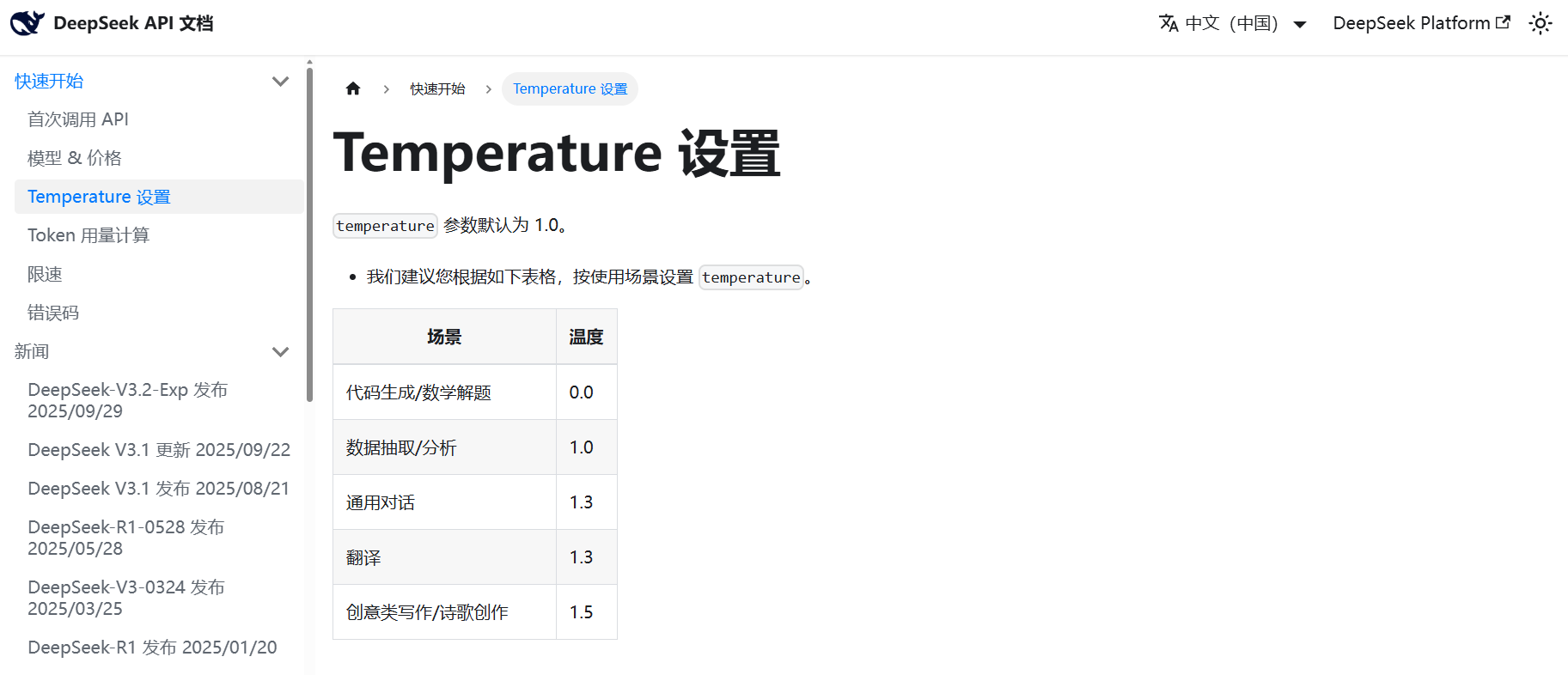
image-20251115162539563

Define response format 定义响应格式

可选地,如果你需要代理的响应匹配特定模式,可以定义一个结构化的响应格式。

1
2
3
4
5
6
7
8
9
10
from dataclasses import dataclass

# We use a dataclass here, but Pydantic models are also supported.
@dataclass
class ResponseFormat:
"""Response schema for the agent."""
# A punny response (always required)
punny_response: str
# Any interesting information about the weather if available
weather_conditions: str | None = None

定义了一个数据类(dataclass)ResponseFormat,用于规范智能体(agent)的响应格式。

  1. @dataclass:这是一个装饰器,它允许我们定义一个数据类。数据类通常用于存储数据,并自动生成特殊方法,如__init____repr__等。
  2. class ResponseFormat::定义了一个名为ResponseFormat的类。
  3. 类文档字符串:"""Response schema for the agent.""" 说明了这个类的作用,即作为智能体的响应模式(schema)。
  4. 类属性:
    • punny_response: str:这是一个字符串类型的属性,用于存放带有双关语的响应(punny response)。注释# A punny response (always required)表明这个字段是必须的。
    • weather_conditions: str | None = None:这是一个可选的字符串类型属性,用于存放天气条件信息。它可以是字符串或者None(默认值为None)。注释# Any interesting information about the weather if available说明如果有什么有趣的天气信息,可以放在这里。

使用@dataclass定义的数据类,我们可以轻松创建实例,例如:

1
2
3
4
5
6
7
response1 = ResponseFormat(punny_response="It's raining cats and dogs!", weather_conditions="Heavy rain")
response2 = ResponseFormat(punny_response="The sun is shining brightly!")

print(response1)
# 输出:ResponseFormat(punny_response="It's raining cats and dogs!", weather_conditions='Heavy rain')
print(response2)
# 输出:ResponseFormat(punny_response='The sun is shining brightly!', weather_conditions=None)

在这个例子中,智能体的响应将被结构化,确保始终包含一个punny_response,而weather_conditions是可选的。这有助于在程序中使用一致的响应结构,方便后续处理。

Add memory 添加记忆

为你的智能体添加记忆功能,以在交互中保持状态。这使智能体能够记住之前的对话和上下文。

1
2
from langgraph.checkpoint.memory import InMemorySaver
checkpointer = InMemorySaver()

这段代码从LangGraph库导入了内存检查点保存器InMemorySaver并创建了一个实例,该检查点保存器能够在内存中存储和管理智能体的对话状态,使智能体能够记住同一对话线程中之前的交互内容和上下文信息,从而实现连续的多轮对话能力。

Create and run the agent 创建并运行代理

现在用所有组件组装你的代理并运行它!

1
2
3
4
5
6
7
8
9
10
11
12
13
14
15
16
17
18
19
20
21
22
23
24
25
26
27
28
29
30
31
32
33
34
35
36
37
38
39
40
41
42
43
44
45
46
47
48
49
50
51
52
53
54
55
56
57
58
59
60
61
62
63
64
65
66
67
68
69
70
71
72
73
74
75
76
77
78
79
80
81
82
83
84
85
86
87
88
89
90
91
92
93
94
95
96
97
98
99
100
101
102
103
104
105
106
107
108
from dataclasses import dataclass
import os
from langchain.agents import create_agent
from langchain_openai import ChatOpenAI
from langchain.tools import tool, ToolRuntime
from langgraph.checkpoint.memory import InMemorySaver
from dotenv import load_dotenv

# 加载.env文件中的环境变量(包含DEEPSEEK_API_KEY等)
load_dotenv()

# 定义系统提示,指导AI智能体的行为
SYSTEM_PROMPT = """你是一个用双关语说话的专家天气预报员。

你有两个工具:

- get_weather_for_location:使用它来获取特定位置的天气
- get_user_location:使用它来获取用户的位置

如果用户问你天气,确保你知道位置。如果你能从问题中分辨出他们的意思是无论他们在哪里,使用get_user_location工具找到他们的位置。
"""

# 定义上下文数据结构,用于传递用户特定的信息
@dataclass
class Context:
"""自定义运行时上下文模式。"""
user_id: str # 用户ID,用于识别不同用户

# 定义工具函数 - 获取指定城市的天气信息
@tool
def get_weather_for_location(city: str) -> str:
"""获取指定城市的天气信息。"""
return f"It's always sunny in {city}!"

# 定义工具函数 - 根据用户ID获取用户位置
@tool
def get_user_location(runtime: ToolRuntime[Context]) -> str:
"""基于用户ID检索用户信息。"""
# 从运行时上下文中获取用户ID
user_id = runtime.context.user_id
# 根据用户ID返回不同的位置(示例逻辑)
return "西安" if user_id == "1" else "SF"

# 配置DeepSeek聊天模型
model = ChatOpenAI(
api_key=os.getenv('DEEPSEEK_API_KEY'), # 从环境变量获取API密钥
base_url="https://api.deepseek.com/v1", # DeepSeek API端点
model="deepseek-chat", # 使用的模型
temperature=0.5, # 控制输出随机性(0-1)
timeout=10, # API请求超时时间(秒)
max_tokens=1000 # 最大输出token数量
)

# 定义响应格式的数据类,规范AI输出结构
@dataclass
class ResponseFormat:
"""智能体的响应模式。"""
# 必须包含的双关语响应
punny_response: str
# 可选的天气条件信息
weather_conditions: str | None = None

# 设置内存检查点,用于保存对话状态
checkpointer = InMemorySaver()

# 创建AI智能体,整合所有组件
agent = create_agent(
model=model, # 使用的语言模型
system_prompt=SYSTEM_PROMPT, # 系统提示定义角色和行为
tools=[get_user_location, get_weather_for_location], # 可用工具列表
context_schema=Context, # 上下文数据结构
response_format=ResponseFormat, # 响应格式规范
checkpointer=checkpointer # 内存管理器
)

# 运行智能体 - 第一次对话
# thread_id是对话的唯一标识符,用于跟踪对话状态
config = {"configurable": {"thread_id": "1"}}

# 调用智能体处理用户查询
response = agent.invoke(
{"messages": [{"role": "user", "content": "what is the weather outside?"}]}, # 用户消息
config=config, # 配置包含thread_id
context=Context(user_id="1") # 传递用户上下文
)

# 打印结构化响应
print(response['structured_response'])
# 预期输出示例:
# ResponseFormat(
# punny_response="Well, it looks like the weather in Xi'an is absolutely radiant! You could say it's always sunny in Xi'an - talk about a bright outlook! Don't forget your sunglasses, because this forecast is looking positively glowing!",
# weather_conditions="It's always sunny in 西安!"
# )

# 继续对话 - 使用相同的thread_id保持对话连续性
response = agent.invoke(
{"messages": [{"role": "user", "content": "thank you!"}]}, # 后续用户消息
config=config, # 使用相同的thread_id
context=Context(user_id="1") # 保持相同的用户上下文
)

# 打印后续响应的结构化输出
print(response['structured_response'])
# 预期输出示例:
# ResponseFormat(
# punny_response="You're very welcome! I'm always happy to brighten your day with a sunny forecast. If you need any more weather wisdom, just let me know - I'm here to help you weather any situation!",
# weather_conditions=None # 这次没有天气信息
# )

恭喜!你现在拥有一个AI agent能够:

  • 理解上下文并记住对话
  • 智能使用多种工具
  • 以一致的格式提供结构化回复的 AI 代理
  • 通过上下文处理用户特定信息
  • 跨交互维护会话状态